 | Jhony Blackstore is free blogger for amazon online store, magazine gallery style, 1 left side bar, 3 footer sidebar, page pagination, drop down header menu, product search and major social media button has been included. GTmetrix score C/D Designed by johnytemplate.blogspot.com / mas-template.blogspot.com   |
Tampilkan postingan dengan label Blogger. Tampilkan semua postingan
Tampilkan postingan dengan label Blogger. Tampilkan semua postingan
Rabu, 15 Januari 2014
Free Blogspot Theme Amazon Online Store

Flows Blogger Template
 | Flows is a free blogger template custom design with 1 Right Sidebar, 2 Column, Ads Ready, Blogger, Bookmark Ready, Fixed, Gray, Slideshow, Wordpress Look, and you can download Flows blogspot template for free only in thememonsters.com Free blogger template with 1 Sidebar, 2 Column, 3 Column footer, Adapted from Wordpress, Blue, Elegant, Featured Section, Fixed width, Header Banner, Magazine, Premium, Right Sidebhttp://www.blogger.com/img/blank.gifar, Slider, Tabbed widget, Top Navigation Bar, Web 2.0, White Background |
| GTMetrix score B/C load time 1.55s file size 702KB How to Install Blogger Theme Designer : Lasantha Bandara / www.premiumbloggertemplates.com / Fthemes.com |
Free and Fast Blogspot Minisite Theme
 | Great blogspot (blogger) minisite theme, its been hard to find fast blogspot theme. White background with simple design or i rather said its minimalistic. Designer were not clearly state about theme compatibility with autoblog tools. This fast and free blogspot theme main feature is : Seo Friendly, Auto Link title on post, Auto tag h1 h2 h3 on keyword, Auto italic, strong on keyword dont forget its fast page load speed. Total page size 77.6KB load time 2.32 second GTmetrix score A/B designed by djiextray |
| |
How To Install Blogger Custom Themes
1.Download a template file (Zip / Rar) and unzip. (Screenshot 1)

2. Log in to Blogger.
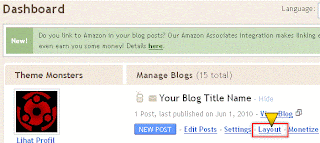
3. Go to "Layout" under "Dashboard". (Screenshot 2)
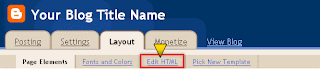
4. Click "Edit HTML" under "Layout". (Screenshot 3)
5. Don't forget for backup your old template. (Screenshot 4)

6. Find and Upload the new Blogger template. (Screenshot 5)

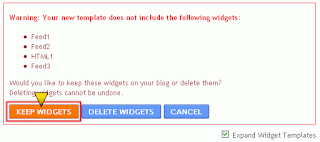
7. If a warning: Your new template does not include the following widgets, click "KEEP WIDGETS". (Screenshot 6)
8. Done!, Enjoy your new blog appearance.

2. Log in to Blogger.
3. Go to "Layout" under "Dashboard". (Screenshot 2)

4. Click "Edit HTML" under "Layout". (Screenshot 3)

5. Don't forget for backup your old template. (Screenshot 4)

6. Find and Upload the new Blogger template. (Screenshot 5)

7. If a warning: Your new template does not include the following widgets, click "KEEP WIDGETS". (Screenshot 6)

8. Done!, Enjoy your new blog appearance.
Sabtu, 02 Maret 2013
Simplesive Fast Simple Responsive Free Blogger Theme
 | Pingdom grade : 92, 433KB, 0.83 seconds GTmetrix home page : A/B, 589KB, 2.83 seconds GTmetrix single page : A/B, 277KB, 2.4 seconds Designed by www.idblogdesign.com / bloggerblur |
Langganan:
Postingan (Atom)