Rabu, 14 Agustus 2013

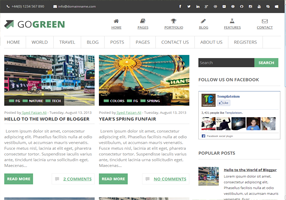
GoGreen Blogger Template

GoGreen Blogger Template
Template Name: GoGreen Blogger Template
Platform: Blogger / Blogspot
Release date : 14, August 2013
Author : www.templateism.com
License : Creative Commons Attribution 3.0

Download Preview


GoGreen is a multipurpose Blogger template with lots of new and indifferent functionalities. It is elegantly clean with a touch of FLAT UI but it is not totally flat. The dynamics of this theme are extremely pure and it gives a sparkling shine to your blogger site. Unlike most of the other blogger templates, GoGreen would give you a professional touch that your visitors would be unable to guess that  whether you are using Blogger or any other platform like WordPress, etc.

GoGreen Blogger Template

Features of GoGreen Blogger Template:

  1. Highly SEO Friendly: This template has High SEO score. Like our most of the themes, we have added really professional SEO Plugins that would certainly help you to attain some extra traffic to your website. The on-page SEO is just perfect for a blogging niche site. 

  2. Icon Navigation Menu: People always like pictures and images than just a simple piece of text. Therefore, in this template, we have included a quite clean and elegant icon based navigation menu that would certainly not let you down. Don’t worry normal navigation menu is also there so its two in one. Pretty cool huh?

  3. Thumbnail Related Posts: In this theme, we have added a Thumbnail Related post widget which would work on automation. The Thumbnails are of normal size so it could easily be seen by the readers.

  4. Related Posts: This theme also has a related post gadget which appears just beneath your posts. It displays related posts in systematic order along with their featured thumbnails.

  5. Robust Commenting System: Finally, in this theme we incorporated a wholesome Robust and elegant commenting system. It has some hand full of features. The most prominent feature is the “Verified” Icon that appears only with the BLOG Admins. It differentiates the comments of an admin and the users. Pretty cool it looks like.
More Features: Magazine Style, geenish scheme, threaded commenting system, 2 column template, static sidebar and much more.

From The Editor's Desk:

The name of this theme is "GoGreen" because we are dedicating it to "Pakistan" on its 67th Independance day. However, anyone living in any part of the world can download it for absolutely FREE. Let us know what are your thoughts about this theme?

Minggu, 04 Agustus 2013

Cricket Mag Blogger Template

Videoism Blogger Template

Template Name: Cricket Mag Template
Platform: Blogger / Blogspot
Release date : 4, August 2013
Author : www.templateism.com
License : Creative Commons Attribution 3.0

Download Preview


The Versatile Cricket Mag Blogger Template is the best sports blogger template especially for Cricket fans and lovers. Probably the best sport magazine theme if you are looking to put up an original sport magazine portable. It comes up with lots of custom style widgets that go great with the template. It is Ad friendly, and there are many featured advertisement spots to make your sponsors dance to their boots. On the top of that, there are many other significant features that would make you say "Wow".

Features of Cricket Mag Blogger Template:

  1. Static Homepage: The Home page of this theme is static. Thus, the Slider and few more gadgets would only appear on the homepage so it may not interest the user-friendly experience of your visitors. There are many features stops for advertisements, features posts and etc.

  2. Best for a sport website: This has the best sport Blogger template. It comes with a load of dynamic gadgets including featured home page, featured content and advertisement spots.

  3. Custom header design: To immerse your users. Cricket Mag Comes up with a built in custom header design. We have crafted it for every major aspect so that you name it and he go it.

  4. Highly SEO Friendly: It is not just an SEO Friendly theme because it is highly optimized for Search engines. Unlike our other themes, we have integrated some advance techniques that would surely bring some more traffic to your website.

  5. Multi-Level Drop Down Menu: The most noteworthy aspect of this template is its multi-level Drop down menu that works quite intensely. The jQuery used to create the drop down effect is tremendously modest and hardly takes seconds to load.

  6. Featured Ads Spot: we have always experimented while allocating the featured advertisement spots but this time we have selected the most appropriate locations. We did a research work over the areas which are highly viewed by users. As a result, the theme spots were decided.
More Features: Magazine Style, geenish scheme, threaded commenting system, 2 column template, static sidebar and much more.

From the Designer's Desk:

We hope this much awaited template would certainly help a lot of sports bloggers in renovating their blog with awesomeness. The speed and the performance it is quite brilliant and the plus point is that it is cross browser supported. Let us know, what you think about this theme by commenting your reviews below. 

Sabtu, 13 Juli 2013

Videoism Blogger Template

Videoism Blogger Template
Template Name: Videoism Blogger Template
Platform: Blogger / Blogspot
Release date : 13, July 2013
Author : www.templateism.com
License : Creative Commons Attribution 3.0

Download Preview


Videoism is a professional video hosting blogger template designed for video site and video blog portal. This template would help everyone in setting up a professional video site rather quickly. It is somewhat inspired from popular video hosting websites like YouTube, Vimeo, Dailymotion and etc. No modest to say that this is the most powerful and robust Video Blogger template ever. It has significant features that would surely make your visitors feel great. It is extremely light weight and has quite impressive features too.

Videoism Blogger Template

Features of Videoism Blogger Template:

  1. Video Hosting: This template allows you to host video clips from YouTube, Dailymotion, Metacafe and etc. You just need to paste the embed code, and it would automatically fetch thumbnails. It means there is no need to add images manually the way we do with normal blog templates.

  2. Video Views Counter: Like every other video hosting site, we have added views counter which would appear just beneath the videos. It works on pageviews so, whenever someone would reload the page it would increase the number of views in the counter.

  3. SEO Friendly: We have used some new techniques while optimizing this theme for Search engine optimization. It is pre-optimized for on-page SEO Including heading tags, Meta tags, Keywords and in-depth optimizing things.

  4. Static Homepage: The Home page of this theme is static. Thus, the featured post thumbnails and few more gadgets would only appear on the homepage so it may not reduce the user-friendly experience of your visitors.
More Features: Magazine Style, white color scheme, threaded commenting system, 3 column template, 2 column sidebar and much more.

How to Add Videos?

If you would use the old Video Embed code, it may not show the thumbnails. Therefore, make sure you use the following technique to embed your videos.  Go to Blogger >> Add a new Post >> Html Tab >> Paste the code there and replace the Video URL.
<iframe width="662" height="320" src="http://www.youtube.com/embed/Bf38HiYPMiI" frameborder="0" allowfullscreen></iframe>

How to Customize Feature Label Area:

The first thing you need to do is to go to Blogger.com >> Your site >> Layout >> Add a Gadget >> Add HTML/JavaScript and paste the following code in the HTML Text box.
<script style='text/javascript'>
var numposts = 6;
var showpostthumbnails = true;
var displaymore = false;
var displayseparator = false;
var showcommentnum = false;
var showpostdate = true;
var showpostsummary = true;
var numchars = 75;
</script>
<script src='/feeds/posts/summary/-/Feature?orderby=published&alt=json-in-script&callback=showrecentpostswiththumbs'></script>
Now either replace "Feature" from the following coding to a keyword that you want to use as a Label so show up posts in this featured area. On second thoughts, you can tag your posts with "Feature" label and those posts would start appearing.

From the Designers Desk:
We hope this template would help you in setting up your very own video hosting site cheaply at Blogger. The speed and the performance it is quite brilliant and the plus point is that it is cross browser supported. Let us know what are your thoughts about this template in the comments below?

Jumat, 28 Juni 2013

WebDepot Blogger Template

WebDepot Blogger Template
Template Name: WebDepot 
Platform: Blogger / Blogspot
Release date : 28, June 2013
Author : www.templateism.com
License : Creative Commons Attribution 3.0

Download Preview


The WebDepot Blogger Template is a combination of different color schemes which makes it look unique. This theme is ideal for Designing, web developing, and Magazine based website especially for those who stress more towards designing niche. Unlike our other themes, this has a lot of matchless features including some CSS3 inclusion and other significant functions. When you talk about pure designing, this template is almost invisible because we have used a lot of features for the first time. It has clean and sleek design and has a lot of gutsy utilities.

WebDepot Blogger Template

Features of WebDepot Blogger Template:

  1. Colorful Sidebar Title: Unlike other blogger templates, we have first time use a new technique to display colorful sidebar titles along with a smallish icon. For example, for Facebook Widget, we have used Dark blue sidebar title along with a small Icon “F” Logo representing Facebook.

  2. Eye-Catching Social Counter Buttons: At the bottom of each post, you can see social count buttons arranged in such a way that it could bring an eye-catching spark in your visitors. We have added Facebook, Twitter and Google+ social counter buttons.

  3. SEO Friendly: Like our most of the theme, this is also SEO Friendly. It is pre-optimized for on-page SEO. Including heading tags, Meta tags, Keywords and in-depth optimizing things. More importantly, the speed of this it significantly faster than the majority of other heavy-duty templates. 

  4. Thumbnail Related Posts: In this theme, we have added a Thumbnail Related post widget which would work on automation. The Thumbnails are of normal size so it could easily be seen by the readers.
More Features: Drop Down Menu, 4 column footers, multi-color scheme, threaded commenting system, 2 column templates, and much more.

From the Designer's Desk:

We hope this theme has helped you in renovating your blog with awesomeness. Let us know what you think about this multi-color theme? Suggests and bugs would be more than welcomed. On a second note, take a few moments to sign up for our newsletter to keep on enjoying our latest theme release. Use the Subscription widget located in the sidebar, just round the corner!

Jumat, 21 Juni 2013

Folio360 Blogger Template

Folio360 Blogger Template
Template Name: Folio360 Blogger Template
Platform: Blogger / Blogspot
Release date : 21, June 2013
Author : www.templateism.com
License : Creative Commons Attribution 3.0

Download Preview


Folio360 Blogger Template is a “Heavy Duty” theme designed for Designers who loves to show off their portfolio. It is truly a powerful, highly flexible and customizable theme which will indeed help you to grow. This theme is perfect for Wallpaper and pictorial based websites. It has lots of striking and incredible features which would impress you and your visitors too.  It has clean and sleek design which is considered as the basic need of a portfolio template.

Folio360 Blogger Template

Features of Folio360 Blogger Template:

  1. Portfolio Design: This theme is solely made for Wallpapers, portfolio and picture based websites. The design is extremely creative and flexible. In other words, you can say that it is a perfect combination of portfolio and a blog. 

  2. Sleek Sidebar: In this theme, we have added a sleek and cute sidebar. Though, most of the portfolio themes do not have sidebars, but that’s why we are unique and trend setter. We have just added a sleek sidebar to just give some space for advertisements and other information.

  3. Static Homepage: The Home page of this theme is static. Thus, the featured post thumbnails and few more gadgets would only appear on the homepage so it may not reduce the user-friendly experience of your visitors.

  4. Thumbnail Related Posts: In this theme, we have added a Thumbnail Related post widget which would work on automation. The Thumbnails are of normal size so it could easily be seen by the readers.
More Features: SEO Friendly, 4 column footer, orange color scheme, threaded commenting system, 2 column template,   and much more.

From the Designer's Desk:

We hope this portfolio theme would help you in renovating your site with Awesomeness. The speed of this theme is extremely fast and takes just seconds to load. Let us know what you think about this robust portfolio theme? If you face any bug or error feel free to comment below. 

Jumat, 14 Juni 2013

Retina Blogger Template

Retina Blogger Template


Template Name: Retina Blogger Template
Platform: Blogger / Blogspot
Release date : 14, June 2013
Author : www.templateism.com
License : Creative Commons Attribution 3.0

Download Preview


Retina Blogger template is a versatile magazine style theme designed for those blogs which are multi-niched, or covers a lot of stories of different categorize at just one place. It is still ideal for all kind of blogs like Technology, Entertainment, News, Magazine, Gadgets. It has the tendency to accommodate almost anything. It is jam-packed with lots of customized widgets. Just install this template, sit back and enjoy. This theme has pure appearance with crystal clear touch. The outlook is so beautiful that you cannot stop yourself from saying a WOW!

Retina Blogger Template

Features of Retina Blogger Template:

  1. JQuery Image Slider: In this Template, we have incorporated a modest and light weight jQuery image slider that works pretty well. It has some cool transition effect which would surely look well with your website. Just like every other slider, we have play, pause, forward and backward buttons. 

  2. Featured Label Area:  With this theme, you can use “Labels” to display posts on your homepage.   It drives data of your posts from Labels and displays them on your homepage. It shows the thumbnail of the posts along with their title in a systematic manner. 

  3. Related Posts: This theme also has a related post gadget which appears just beneath your posts. It displays related posts in systematic order along with their featured thumbnails.

  4. SEO-Friendly: This theme is absolutely brilliant for search engines. This theme has the highest search engine optimization score. The speed of this template is 90 out of 100 according to Google Speed insights.
More Features: Magazine Style, blue color scheme, threaded commenting system, 2 column template, 2 column sidebar and much more.

How to Customize Feature Label Area:

The first thing you need to do is to go to Blogger.com >> Your site >> Template >> Edit HTML and search for this code. Quick Tip: You will find this code some way near to the <body> Tag.
 <div id='featurebottom1'><h2 class='headingfeature'>#Technology</h2>
<div class='left-corner-canvas'/>
    <script src='/feeds/posts/summary/-/Technology?max-results=4&amp;orderby=published&amp;alt=json-in-script&amp;callback=recentthumbs&amp;' type='text/javascript'/>
<a class='readmoretopic' href='/search/label/Technology'>Browse More</a>
         </div>
<div style='clear:both;'/> 
Now either replace "Technology" from the following coding to a keyword that you want to use as a Label so show up posts in this featured area. On second thoughts, you can tag your posts with "Technology" label and those posts would start appearing.

Note: Repeat the same process until you have customized all four Label featured areas.

From the Designer's Desk: 

This Blogger Template is just amazing for those blog which are based on technology, sports, entertainment and etc. It is extremely lightweight and has excessively responsive speed. Let us know what you think about this theme? We are anxiously waiting to see your comment. 

Kamis, 06 Juni 2013

Pakistani Mag Blogger Template

Pakistani Mag Blogger Template

Template Name: Pakistan Mag Template
Platform: Blogger / Blogspot
Release date : 7, June 2013
Author : www.templateism.com
License : Creative Commons Attribution 3.0

Download Preview


Pakistani Mag Blogger Template is richly based on the cultures, traditions and beautiful gestures of the peoples living in the four provinces of Pakistan.  Since, this theme is coded by few bunch of Pakistani’s so you can always believe that they have put all the skills they have and have formulated a total masterpiece.  It has some impressive features with totally amazing outlook. From color combination to the selection and styling of widgets everything is so clean and attractive. We have used Green, white and blue colors which give it an inspiring touch. There are many features, out of which can be seen below. This theme is ideal for those blogs who are covering “PAKISTAN” or their blog some way inter links to it.

Pakistani Mag Blogger Template

Features of Pakistani Mag Blogger Template:

  1. A Pakistani Theme: Just like we have said before, this theme is a reflection of the people living in Pakistan. It is decorated with the Pakistani Flags and decorating items. This is the reason why, it gives you a slight out look of the subject of the theme. 

  2. Featured Post Areas: We have connected two featured post gadget areas in this theme. It would fetch your posts from a specific label and will display them on your homepage. However, the latest posts would continue to display beneath them.

  3. Robust Commenting System: Finally, in this theme we incorporated a wholesome Robust and elegant commenting system. It has some hand full of features. The most prominent feature is the “Verified” Icon that appears only with the BLOG Admins. It differentiates the comments of an admin and the users. Pretty cool it looks like.  

  4. Elegant and Beautiful Footer: The footer is extremely elegant and has the capacity to accommodate 3 widgets in a row while unlimited in columns. While the complete outlook is pretty decent, it looks perfect on the theme. 

  5. Related Posts: This theme also has a related post gadget which appears just beneath your posts. It displays related posts in systematic order along with their featured thumbnails.

  6. SEO-Friendly: This theme is absolutely brilliant for search engines. This theme has the highest search engine optimization score. The speed of this template is 90 out of 100 according to Google Speed insights.
More Features: Magazine Style, greenish color scheme, threaded commenting system, 2 column template, sidebar and much more.

How to Customize Feature Post Areas?

This theme has two featured areas, one allows you to show up-to two featured posts while the shows three. These areas would not fetch your posts until you use a certain "Label" on your posts. So we will be explaining you how can show posts on these feature areas. 

1. Customizing "What's Latest" Area: 
The first thing you need to do is to go to Blogger.com >> Your site >> Template >> Edit HTML and search for this code. Quick Tip: You will find this code some way near to the <body> Tag. 
<!--What's Latest Posts -->
<b:if cond='data:blog.url == data:blog.homepageUrl'>
  <div id='featurebottom1'><h2><span class='blackish'>What&#39;s Latest in</span> <span class='greenish'>Pakistan</span> :</h2>
    <script src='/feeds/posts/summary/-/Latest?max-results=2&amp;orderby=published&amp;alt=json-in-script&amp;callback=recentthumbs&amp;' type='text/javascript'/>
         </div>
<div style='clear:both;'/> 
          </b:if>
Now either replace "Latest" from the following coding to a keyword that you want to use as a Label so show up posts in this featured area. On second thoughts, you can tag your posts with "Latest" label and those posts would start appearing in What's Latest" Area.

2. Customizing "What's Trending" Area: 
Now to customize the second area, you need to search for the following code:
<!--What's Trending Posts -->
  <b:if cond='data:blog.url == data:blog.homepageUrl'>
  <div id='featurebottom'><h2><span class='blackish'>What&#39;s Trending in</span> <span class='greenish'>Pakistan</span> :</h2>
    <script src='/feeds/posts/summary/-/Trending?max-results=3&amp;orderby=published&amp;alt=json-in-script&amp;callback=recentthumbs&amp;' type='text/javascript'/>
         </div>
<div style='clear:both;'/>
          </b:if>
 Now either replace "Trending" from the following coding to a keyword that you want to use as a Label so that it show up posts in this 2nd featured area. On second thoughts, you can tag your posts with "Latest" label and those posts would start appearing in What's Latest" Area.

From the Designer's Desk:

We hope everyone enjoys this one of its kind theme for blogger. Though, this is not it. After creating a theme for Pakistan, we have gotten a lot of requests from our followers to create one for their country too. In coming days, we will cover India, Indonesia, Tunis and other countries. Please, let us know about your country so we can include that too. Let us know what you think in the comments.